
The AI PDF to Calculator Workflow - A Demonstration

The AI PDF to Calculator Workflow - A Demonstration
The engicloud.ai platform provides an AI powered PDF to Calculator assistant that will help you convert research papers into calculators for the engicloud.ai platform.
In this blog we will walk you through the entire workflow.
A full screencast is available as well
Stage 1 -- Extraction and Validation
We start by providing the AI tool the research paper in question.
In this example we have chose a geo-technical engineering paper: *Element, Empirical Rheological Model of Soft Soil* [1]
The paper contains various material models for soft soils.
We are specifically interested in the *Seven Component Model* contained in the paper.
But we will ask the model to extract everything to make sure that it does not miss anything.
So we upload the PDF to the model and ask it to extract all the equations.
> please extract the equations
The model now proceeds to extract all the equation that it has found in the paper.
It will output a list of Equations (which are actual equations found in the paper), Methods which are more complex algorithms and/or processes found in the paper, and also References which are references to either equations or methods mentioned in the paper, but not actually provided in the paper itself.
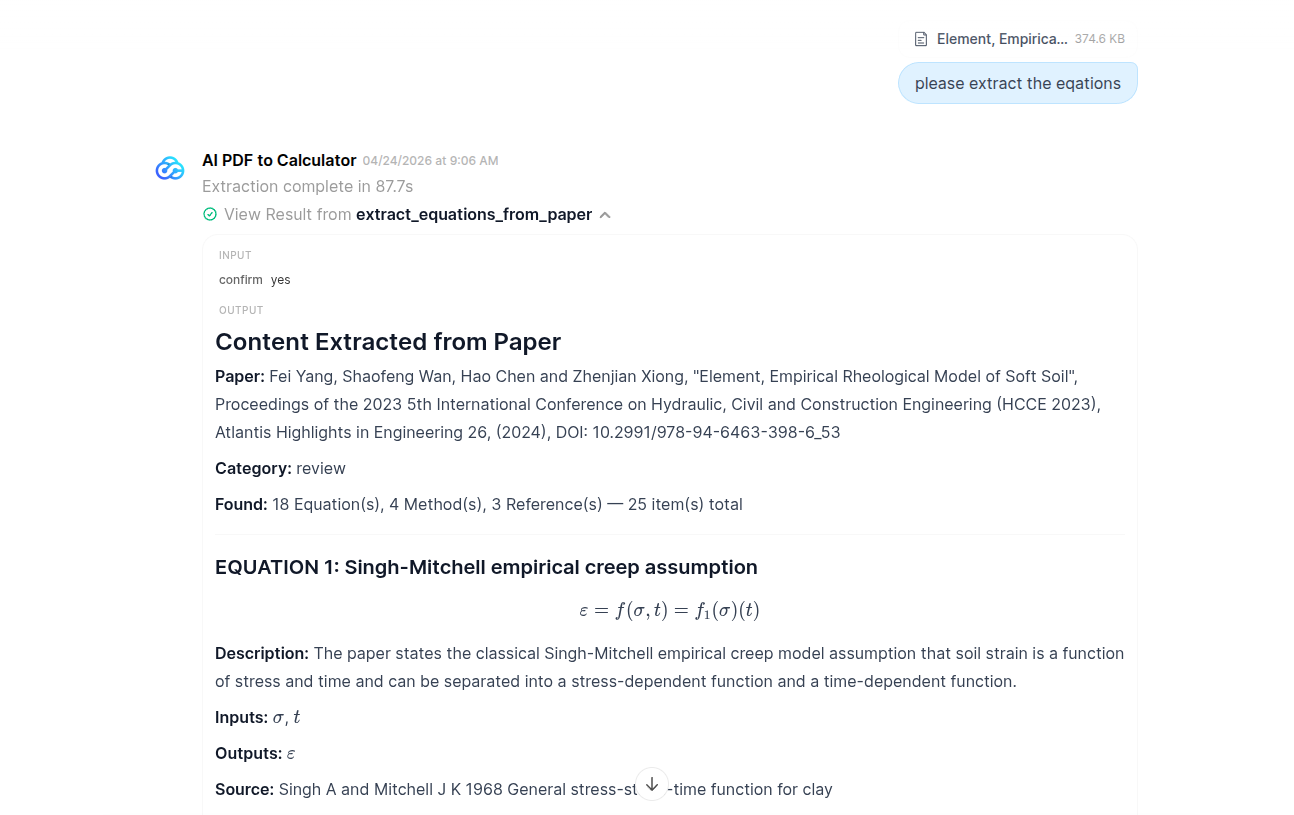
After extraction, our PDF to Calculator assistant would like to validate the equations it has found.
This process checks units and dimensional consistency in the equation, checks for ambiguities, and various other sanity checks.
The assistant uses a turn-based conversational approach to reach a consensus using various models in the backend to ensure correctness.
The Seven Component Model is listed as the 12th entry found by the model (specifically the 7th equation in the paper).
So we proceed to ask the model to validate this equation:
> please validate this equation: 12. Seven-component soft-soil rheological constitutive equation (paper: (7))
The assistant proceeds to validate the equation and reports that it is mathematically valid and dimensionally consistent.
It notes that the Macaulay bracket used in the equation is defined as $$\langle x \rangle=\max(x,0)$$
Stage 2 -- Code Generation and Review
With the equation validation completed we can now proceed to the code generation for our selected equation.
We select the suggested prompt to continue:
> Yes, please generate Python code for Equation 12.
The model now starts the code generation for the *Seven Component Model* using a two-model generation and review process. When the coding and review agents have reached a consensus the model produces the following output:
- the Python code (in the closest possible format to that which [engicloud.ai](https://iq.engicloud.ai/) expects), and
- a table of inputs and outputs to the model with the required metadata (description, default values, units, data type)
import math

class Equation:
    # input variables
    sigma_0: float = 100.0
    e_h: float = 5000.0
    v_1: float = 20.0
    v_2: float = 50.0
    e_1: float = 3000.0
    e_2: float = 2000.0
    eta_1: float = 10000.0
    eta_2: float = 20000.0
    time_elapsed: float = 10.0

    # output variable
    strain: float = 0.0

    def compute(self):
        macaulay_1 = max(self.sigma_0 - self.v_1, 0.0)
        macaulay_2 = max(self.sigma_0 - self.v_2, 0.0)
        self.strain = (
            self.sigma_0 / self.e_h
            + (macaulay_1 / self.e_1) * (1.0 - math.exp(-(self.e_1 / self.eta_1) * self.time_elapsed))
            + (macaulay_2 / self.e_2) * (1.0 - math.exp(-(self.e_2 / self.eta_2) * self.time_elapsed))
        )
We observe here that the code is correct, but that it only produces a single strain value at a given elapsed time.
Since we might be interested to know how this value evolves over time, so we are going to do some refinement.
So we prompt the model to provide us the strain data over a time interval:
> please revised the code to provide the strain data as a time series over a specified interval
The assistant once again begins a code generation process and produces a modified version of the original Python code. It has replaced the elapsed time input with a start and end time as well as a number of interval steps. It also replaced the scalar math operations from the Python math library with array operations provided by numpy. The outputs have been changed accordingly as well to be array data (providing both the evaluation time and evaluated strain).
import numpy

class Equation:
    # input variables
    sigma_0: float = 100.0
    e_h: float = 5000.0
    v_1: float = 20.0
    v_2: float = 50.0
    e_1: float = 3000.0
    e_2: float = 2000.0
    eta_1: float = 10000.0
    eta_2: float = 20000.0
    time_start: float = 0.0
    time_end: float = 10.0
    number_of_steps: int = 11

    # output variables
    time_elapsed_series: array = numpy.array([0.0])
    strain_series: array = numpy.array([0.0])

    def compute(self):
        step_count = max(int(self.number_of_steps), 2)
        self.time_elapsed_series = numpy.linspace(self.time_start, self.time_end, step_count)

        macaulay_1 = max(self.sigma_0 - self.v_1, 0.0)
        macaulay_2 = max(self.sigma_0 - self.v_2, 0.0)

        self.strain_series = (
            self.sigma_0 / self.e_h
            + (macaulay_1 / self.e_1) * (1.0 - numpy.exp(-(self.e_1 / self.eta_1) * self.time_elapsed_series))
            + (macaulay_2 / self.e_2) * (1.0 - numpy.exp(-(self.e_2 / self.eta_2) * self.time_elapsed_series))
        )
The assistant also updated the table of inputs and outputs to reflect these changes. Finally the last task that our assistance can do is provide documentation for the generated calculator.
The engicloud.ai platform supports the following documentation:
- Theory: A markdown formatted document that provides the context in which the calculator is used, the mathematical theory behind the calculator, and lastly references and citations.
- Usage: A pair of markdown formatted tables that describe the inputs and outputs to the model if full detail.
We prompt the model to begin the documentation generation.
> please generate the documentation
Both of these markdown blocks can be copied directly onto the engicloud.ai platform.
For the sake of brevity the exact output of the assistant is ommitted in this blog.
Stage 3 -- Implementation on engicloud.ai
With the code generation finally completed we can start adding this model to the [engicloud.ai](https://engicloud.ai/) platform.
On engicloud we begin a new project and begin a new calculator in that project.
In the Code tab of the calculator editor we are going to add the generated code.
We need to copy all the import statements, and we need to copy the body of the def compute(self) function into the code editor here.
This leaves us with the following:
import numpy

step_count = max(int(self.number_of_steps), 2)
self.time_elapsed_series = numpy.linspace(self.time_start, self.time_end, step_count)

macaulay_1 = max(self.sigma_0 - self.v_1, 0.0)
macaulay_2 = max(self.sigma_0 - self.v_2, 0.0)

self.strain_series = (
    self.sigma_0 / self.e_h
    + (macaulay_1 / self.e_1) * (1.0 - numpy.exp(-(self.e_1 / self.eta_1) * self.time_elapsed_series))
    + (macaulay_2 / self.e_2) * (1.0 - numpy.exp(-(self.e_2 / self.eta_2) * self.time_elapsed_series))
)
Next we need to create the inputs and outputs.
On the left sidebar we see the Create input and Create output buttons.
For each input and output we create an entry in which we specifiy the exact variable name used in the calculator (the self is implicit, eg. self.sigma_0 -> sigma_0).
We can additionally set a description, a data type, a default value and a unit for each input and output -- only the type is actually required, the rest are optional.
The full set of inputs and outputs we need to add here are:
Input variables:
Output variables:
Lastly we can copy our markdown documentation into the editor in the Documentation tab. When we are done we save our calculator by pressing the Save code button. We can test our calculator using Test calculator button.
If all has gone well we now have a fully functional calculator on the engicloud.ai platform.
This calculator can now be used inside any engicloud.ai project!
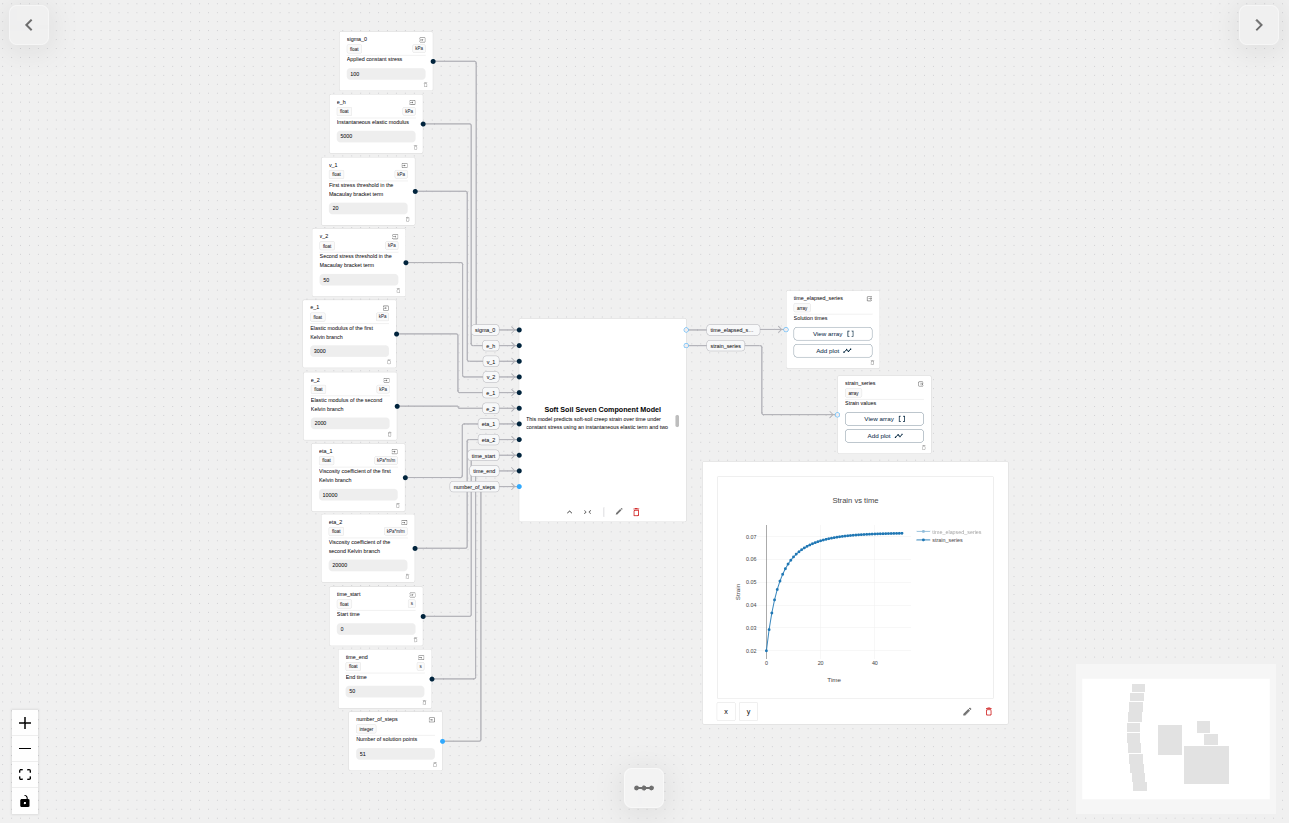
NOTE: Large language models are not deterministic and results may vary.
Check it out!
Have a look at the project directly on the platform or watch the walkthrough video on youtube!
About the author
Dr. Daniel Louw holds a Phd in Mechanical Engineering from Stellenbosch University (South Africa) and has previously worked as a Post-Doc researcher at the group of Prof. Peters at University of Luxemburg, focusing on Multi-phase Modeling of Industrial Biomass Combustion.
He is currently a consultant and software developer at DCS Computing and contributed significantly to for the engicloud.ai calculator library.
References
[1] Fei Yang, Shaofeng Wan, Hao Chen and Zhenjian Xiong, "Element, Empirical Rheological Model of Soft Soil", Proceedings of the 2023 5th International Conference on Hydraulic, Civil and Construction Engineering (HCCE 2023), Atlantis Highlights in Engineering 26, (2024), DOI: 10.2991/978-94-6463-398-6_53